
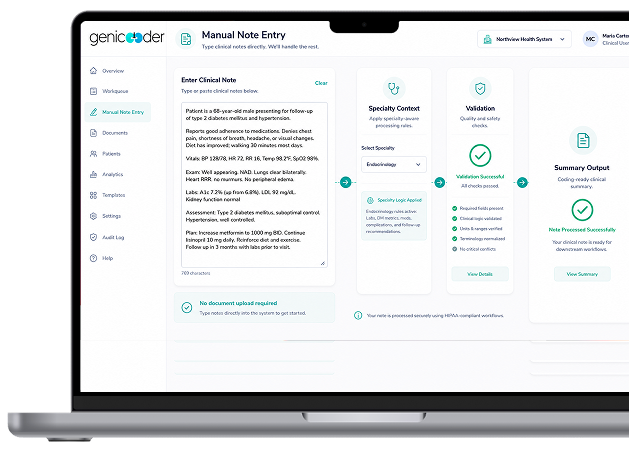

Type Directly Into the Platform

Same Specialty Logic Applies

Same Validation Runs

Results Without Storing Source Notes
Type Directly Into the Platform
Same Specialty Logic Applies
Same Validation Runs
Results Without Storing Source Notes

Select clinical specialty

Enter clinical note

Coding logic runs

Review structured output
From Clinical Text to Coding Output
Enter clinical notes directly into GeniCoder and move from unstructured clinical text to structured code suggestions for review, without a separate document workflow.
From clinical notes to medical codes
Not every encounter starts as a file. Many are typed straight into a system as notes. GeniCoder lets your team enter those clinical notes by hand and run the full coding workflow on them — the same specialty logic, the same validation and the same structured output used for uploaded documents.
There is no file to prepare, convert or upload. The note itself becomes the input, and the result is a set of code suggestions your coders can review.
Note types that can enter the workflow
Typed clinical notes are accepted directly, including:
- SOAP notes
- Consultation summaries
- Procedure notes
Teams that work entirely from typed notes and teams that mix notes with uploaded files can both use this workflow without changing their existing process.
How GeniCoder interprets the clinical text
Before a note is processed, a clinical specialty is selected. That selection controls how the note is interpreted — exactly as it would for an uploaded PDF. The coding rules do not change based on how the content arrives.
Validation checks also run on note-based submissions the same way they run on file uploads, so consistency is enforced regardless of input type. When more than one record is submitted, multi-document validation confirms they share the same patient and specialty context before coding.
Diagnosis and procedure code output
GeniCoder returns structured coding output from the note. For ICD-10 coding from clinical notes, it suggests codes for the documented diagnoses; for CPT coding from clinical notes, it suggests CPT and HCPCS codes for the documented procedures and services.
Coded outputs are reviewable and downloadable without the platform retaining your clinical note content.
How specialty context affects coding
The same clinical finding can code differently depending on specialty. Selecting the specialty first means the correct rule set is active before any code is suggested — including how ICD-10 hierarchy and specificity are applied, and how CPT procedure codes and modifiers are handled.
Learn more about specialty-based coding logic and what the specialty selection controls.
References, reasoning and coder review
Code suggestions are not delivered in isolation. Coding output can be reviewed alongside the reference logic that produced it and traced back to the note and the specialty selection behind it. See how explainable AI medical coding works in the Code References & Transparency module.
Coders stay in control: GeniCoder provides suggestions and structured output, and your team reviews them before anything moves forward.
Example workflow
- Select the clinical specialty. This sets the coding rules for the note.
- Enter the clinical note. Type or paste a SOAP note, consultation summary or procedure note.
- Coding logic runs. Validation and specialty-based coding logic are applied to the note.
- Review the structured output. Coders review the code suggestions and their reference context, then download the result.
Need to check codes that have already been assigned, or work through a large batch? Use the coding audit tool in the Bulk Coding & Code Audit module.
Frequently Asked Questions
Can AI convert clinical notes to ICD-10 and CPT codes?
GeniCoder takes a typed clinical note, applies the coding logic for the selected specialty, and returns ICD-10, CPT and HCPCS code suggestions as structured output. Coders review the suggestions before they are used.
What types of clinical notes can be coded?
Typed clinical notes such as SOAP notes, consultation summaries and procedure notes can be entered directly, without file preparation or conversion.
How are diagnoses and procedures identified from notes?
The note is interpreted in the context of the selected clinical specialty, which controls how diagnoses are interpreted and how procedures are coded. The documented diagnoses lead to ICD-10 suggestions and the documented procedures and services lead to CPT and HCPCS suggestions.
Can coders review AI-generated code suggestions?
Yes. Every result is structured output for review. Coders can see the suggestions alongside the reference logic behind them, and the output can be downloaded once reviewed.
How does specialty context affect note-to-code output?
The same clinical finding can code differently by specialty. The selected specialty decides which coding rules are active, how ICD-10 specificity is applied and how CPT procedure codes and modifiers are handled.
What is the difference between coding a SOAP note to ICD-10 and to CPT?
ICD-10 codes describe the diagnoses and conditions documented in the note, typically drawn from the assessment. CPT codes describe the procedures and services performed, such as the visit or any procedure documented in the plan. GeniCoder suggests both from the same note.
How does AI coding from notes differ from manual coding?
In manual coding, a coder reads the note and looks up each code. With GeniCoder, the note is interpreted using the selected specialty’s rules and returned as structured code suggestions with reference context, which the coder then reviews instead of starting from scratch.